Sharp AR-5620D Printer Driver & Reviews
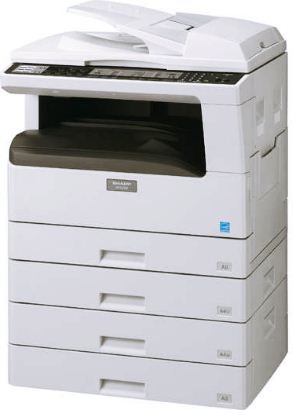 |
| Sharp AR-5620D |
Sharp AR-5620D PCL6 Driver for Windows, Mac, Linux & Manual Installations, Toner Cartridges– Once you use the Sharp AR5620D Printer you are able to save on printing expenses. This is a printer that combines quality and speed for easy printing at home or workplace. Make your home office a smart office for this printer. Not only does it offer high quality prints, this printer delivers an impressive number of published outputs. Designed to print images for newsletters, reports, presentations, mail-pieces or booklets, It provides impact. In selecting a product that is right for you, call us now.
Sharp AR-5620D Specifications
- Copy Resolution 600 x 600 dpi
- Model Sharp General Printer [AR-5620D]
- Printer Required Option Standard
Scanner - Standard Memory 64MB
- Dimensions 591 x 567 x 595 mm
- Maximum Paper Size A3 (11″ X 17″)
- Standard Fonts Hostbased
- Approx Weight 32.8kg (72.3 lbs)
- Max Power Consumption 1.2kW
- File Formats BMP, TIFF, PDF
- Scan Resolution Push Scan: 75, 100, 150, 200, 300, 400, 600 dpi, Pull Scan: 50 to 9600 dpi via user setting, USB Mem more…
- Max Paper Capacity 1100
- Print Resolution 600 x 600 dpi
- Standard Interface USB 2.0
- Network TCP/IP (iPv4)
- Standard Paper Capacity 600 (250 x 2 + 100)
- Paper Size Min A6R (5.5″ x 8.5″)
- Supported OS Std. Windows 2000/XP, Windows Vista, Windows 7
- Continuous Copy Max. 999
- First Copy Time Approx. 7.2
sec - Control Panel
Display LED - Warm-up Time Approx 25
sec or - Max. Original Size A3 (11″ X 17″)
- Network Protocols Opt. TCP/IP (iPv4)
- Supported OS Opt. Windows Server 2003/2008
- Interface Opt 10BaseT/100BaseTX
- Zoom Range 25 to 400% (25 to 200% using RSPF/SPF), 8 preset ratios
- Fonts Opt. PCL: 80 fonts
- Copy/print Speed Max. 20
cpm ppm
How to Install Sharp AR-5620D for Windows
- Click the Printer Driver button.
- Click the Standard installation button.
- Printers connected to the network are detected. Select the machine & click the Next button.
- A confirmation window appears. Check the contents & then click the Next button.
- Follow the on-screen instructions.
- If you are using Windows Vista, Server 2008, 7, 8, Server 2012, be sure to click Install this driver software anyway.
- If you are using Windows XP, Server 2003, be sure to click the Continue Anyway
or
- When the installation
completed - Click the Close button in the window
How to Uninstall Sharp AR-5620D Windows
- Click the start button & then click Control Panel.
- Click Uninstall a program.
- Choose the program or driver that you wish to delete.
- Restart your computer.
How to Install Sharp AR-5620D for Mac OS
- Insert the “Software CD-ROM” into your computer’s CD-ROM drive.
- Double-click the CD-ROM icon on the desktop.
- Double-click the MacOSX folder
- Double-click the folder corresponding to the versions of the operating system.
- Double-click the MX-C42 icon
- Click the Continue button.
- The License Agreement window will appear. Make sure that you understand the contents of the license agreement and then click the Continue button.
- Click the [Install] button.
- When the installation
completed - Click System Preference in the Apple menu and select Print & Scan.
- Click the + button and select “XXXX”.
- Configure the printer driver.
- Click the Option & Supplies button & click the Driver tab.
- Click the Default icon.
- Click the machine’s model name.
- Choose that the PPD file of your model.
- Click the Add button.
- Select the machine configuration.
- Choose the options that are installed on the machine.
- Click the OK button.
- Click to close the window.
How to Uninstall Sharp AR-5620D for Mac OS
- Delete the printer that using the machine PPD file from the printer list.
- Delete the PPD file.
- Delete the installation information.
How to Connect Sharp AR-5620D Copiers to a PC
- Insert the CD that came with the Sharp AR-5620D copier into the computer. Click the “Start” button, select “Computer” and double-click the drive containing the CD if the software does not start automatically.
- Double-click “Setup.” Click “Yes” if a user account prompt appears. Read the license agreement, then click “Yes” if you agree to the terms and conditions. Click “Next.”
- Click the “Printer Driver” button and select “Custom Installation.” Select “Connected to this computer” and click “Next.” Choose whether you want to install display fonts and click “Next” again. Click “Next,” then click “OK” to complete the installation. Click “Close” to exit the installation window.
- Turn on the copier. Insert the USB cable into the USB port on the front or
side - Click “Install Software Automatically,” then click “Next” to start the wizard. Select “Install This Driver Software Anyway” if a warning appears. Close the wizard when the setup is complete.
Sharp AR-5620D Driver Download for Windows
Download – SHARP AR-5620D PCL6 Driver Installer
Windows 10, Windows 8.1, Windows 7, Windows Vista, Windows XP
Download – SHARP AR-5620D Driver Version 1.0.0.9
Windows 2000 (5.0) 64 bit
Windows XP (5.1) 64 bit
Windows Server 2003 (5.2) 64 bit
Windows Vista (6.0) 64 bit
Windows 7 (6.1) 64 bit
Windows 8 (6.2) 64 bit
Windows 8.1 (6.3) 64 bit
Windows 10 (10.0) 64 bit
Download – SHARP AR-5620D Driver Version 1.0.0.8
Windows 2000 (5.0) 64 bit
Windows XP (5.1) 64 bit
Windows Server 2003 (5.2) 64 bit
Windows Vista (6.0) 64 bit
Windows 7 (6.1) 64 bit
Windows 8 (6.2) 64 bit
Windows 8.1 (6.3) 64 bit
Windows 10 (10.0) 64 bit
Download – SHARP AR-5620D Driver Version 1.0.0.8
Windows XP (5.1) 32 bit